AI Account Research: Find Who to Sell To, and Why
AI account research in TotalGTM: find who's talking about a topic, map a company's likely pains and who owns them, and turn it into contacts and drafts.
Before you write to a company, you need two answers: why would they care, and who should hear it? Getting those by hand means an afternoon of reading websites, forums and LinkedIn for every account.
AI account research does that reading for you. In TotalGTM, two tools do most of the work. Topic Research finds out what people are saying about a subject and who is saying it. Deep Dives take one company and lay out the problems it likely has, how you help with each one, and the job titles that own them. Both end in the same place: people in your contacts and outreach drafts for you to review.
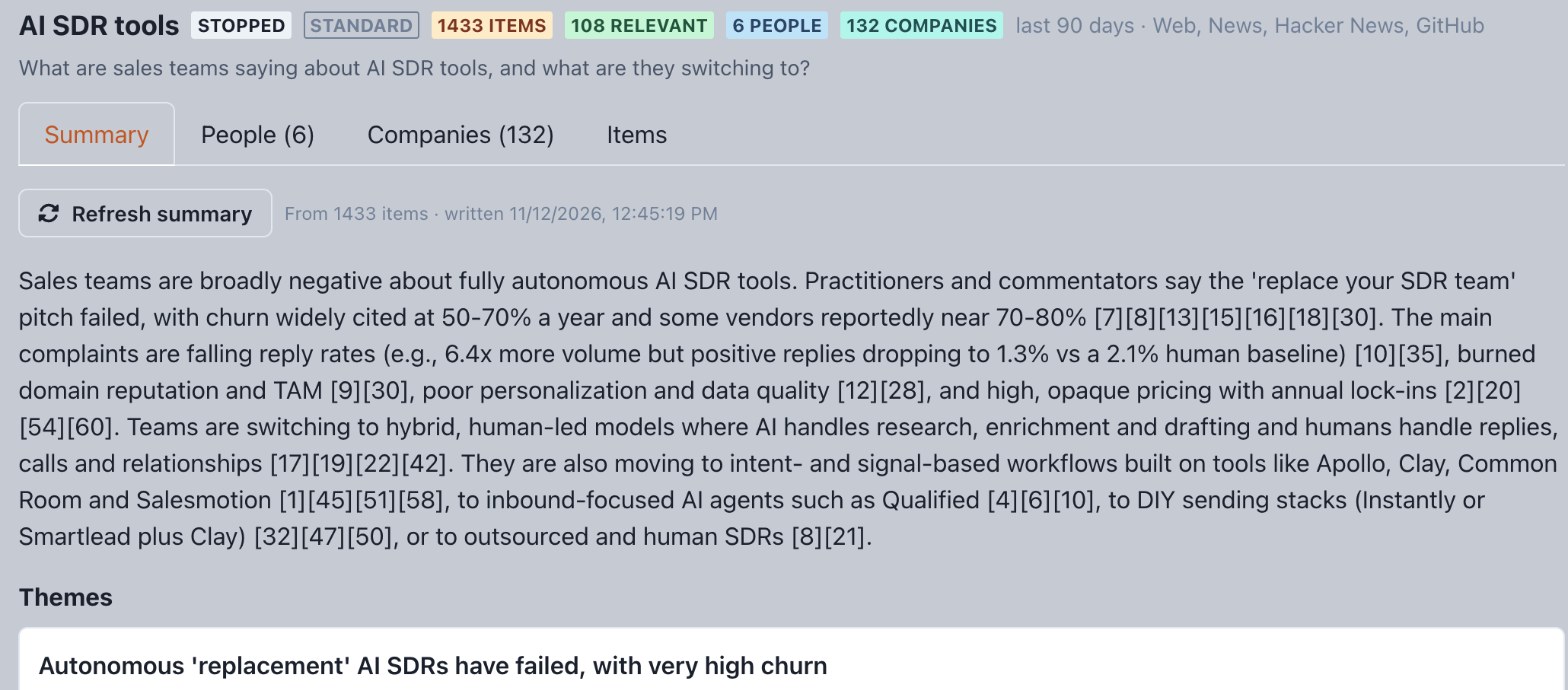
Topic Research: AI account research that starts with a question
The best accounts are often the ones already talking, in public, about the problem you solve. Topic Research goes and finds them.
Open Topic Research and click to start a new one. You’ll be asked:
- What do you want to find out? Write it in plain words, like “Find what people are saying about moving off Red Hat and what they are switching to.”
- Depth. Quick runs 4 searches per source. Standard runs 8 and reads about 30 web pages in full. Deep runs 12 and reads about 80.
- Time window. The last 7, 30, 90, 180 or 365 days.
- Sources. Web, News, Hacker News, Forums, Stack Exchange, GitHub, Reddit and LinkedIn posts.
Reddit and LinkedIn posts run in your own signed-in browser tab through the TotalGTM Chrome extension. The other sources don’t need it.
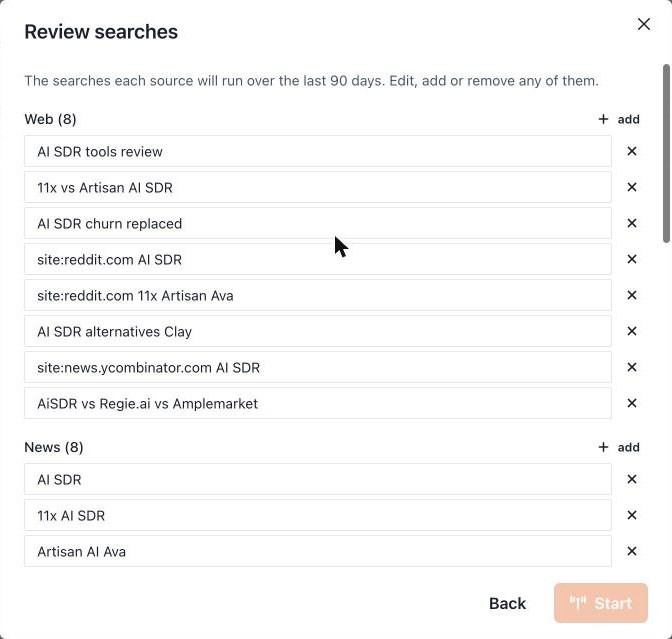
Check the plan before it runs
TotalGTM turns your question into a list of searches for each source and shows them to you first. Edit any of them, add your own, or remove the ones that miss the point. If you picked Forums, you can also list which forums to search. Then start it.
You can stop a run at any time. Whatever it found up to that point is kept.
What you get back
A finished run has four tabs:
- Summary. An overview, the main themes, the people and companies that matter, and the open questions. Every point links back to the posts it came from, so you can check it.
- People. The people who wrote or were quoted. Each is scored for how relevant they are to your question and, if you have an ideal customer profile, how good a lead they are for it.
- Companies. The companies that came up, scored against your ideal customer profiles, with the evidence for each.
- Items. Every post and article it found, which you can sort by most relevant or most recent.
Turn it into contacts and accounts
On People, tick the ones you want and click Add to Contacts. Anyone with a full name or a LinkedIn profile can be added. For people with a full name but no LinkedIn profile yet, Find on LinkedIn looks them up in your LinkedIn tab.
On Companies, each row has two next steps:
- Find people searches LinkedIn for people at that company with the titles that came up in the research.
- Deep dive starts a deep dive on the company for your best-fitting ideal customer profile, or for another one you pick.
That’s how a question about a market becomes a short list of accounts and people.
Company deep dives: account research for one target
Topic Research tells you who to look at. A deep dive tells you what to say to one company and who to say it to.
Open Deep Dives and create a new one. Pick your company profile and the ideal customer profile it’s for, then give the target company’s name and website. The website doesn’t have to be the homepage; any public page with a good overview of the company works. A deep dive takes a few minutes, and it shows up in Deep Dives when it’s ready.
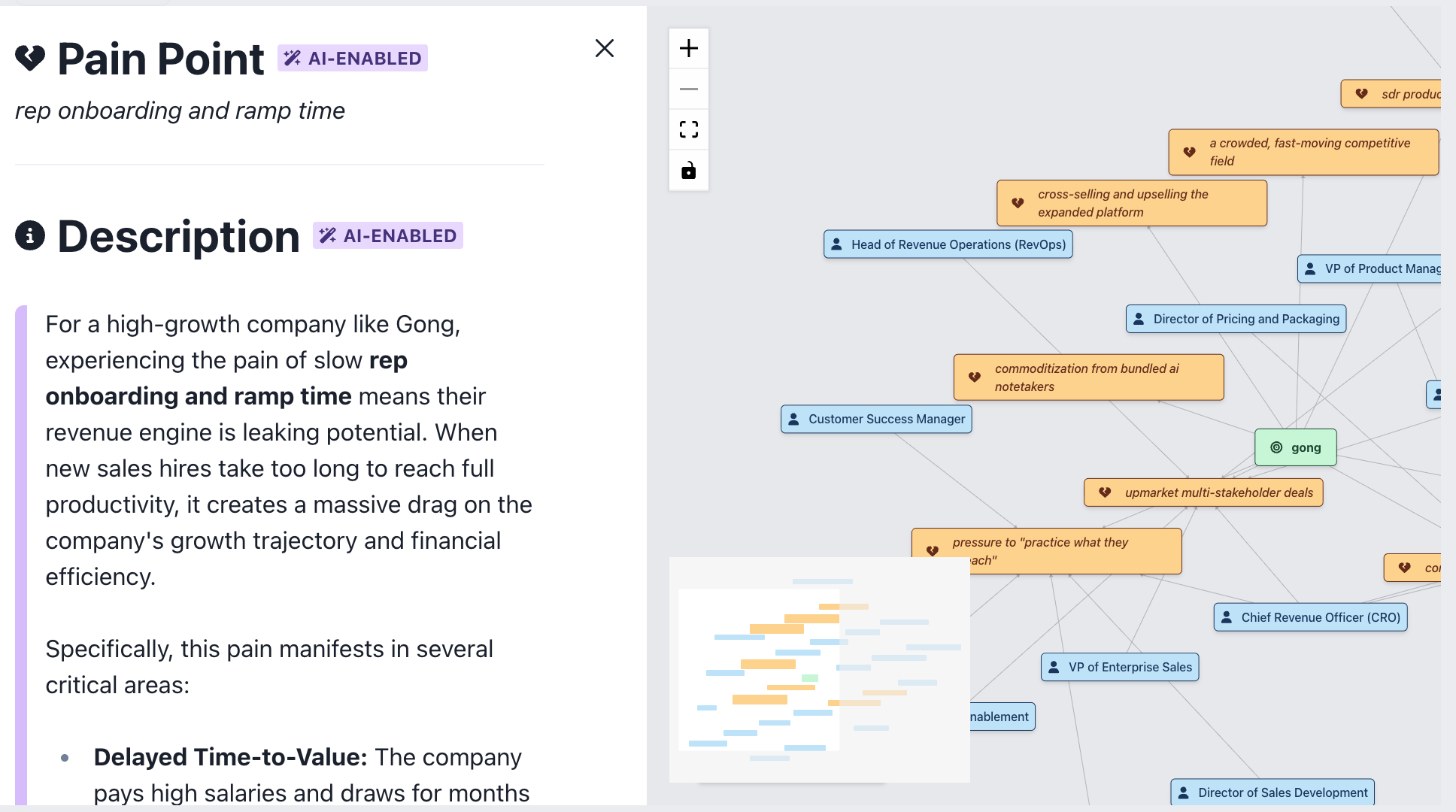
TotalGTM reads the target’s website and builds a map with:
- Pain points the company is likely dealing with, given what you sell.
- For each pain: what it means for that company, How We Help with it, and how it fits your ideal customer profile.
- The job titles most likely responsible for solving each pain.
These are informed guesses from the company’s own website and your profiles, not facts about the company. Read them as a starting point for your own judgment.
You can also start a deep dive from a company in an opportunity landscape, or from the Companies tab of a Topic Research run, as above.
Recommended people
Below the map, Recommended people lists the titles from the deep dive, ranked by how many of its pains each title owns. Add more titles if you like. Find people on LinkedIn then searches that company on LinkedIn, in your own browser, for people close to those titles.
Pick the ones you want and click Add to Contacts.
From research to outreach drafts
Click any pain point in a deep dive and you’ll find generate Outreach Content under it. The target company and how you help are already filled in from the research. Choose a style and length, and either a target recipient, a persona or an ideal customer profile. Then click generate Outreach for a subject and body you can copy, or A/B Test for a few versions side by side. You can score a draft for its strengths and issues, and save one you like as a template.
This is where research pays off. A message built on a pain the company likely has, written for the person who owns it, reads very differently from a template. We wrote about why that matters in why email personalization takes so long, and how AI fixes it.
Research never contacts anyone
Research only reads and reports back. Nothing is added to your contacts until you add it, and an outreach draft is just a draft. Emails go out when you send them.
What it costs
Research uses your organization’s AI setup, like everything else in TotalGTM that writes or reads:
- On TotalGTM’s models, it draws on your organization’s credits.
- On your own or your organization’s AI key, it runs on that key and your provider bills you directly. See bring your own AI key for sales prospecting.
Run it from Claude, too
If you use Claude, the TotalGTM connector for Claude can plan and start Topic Research, read the people and companies it found, add people to your contacts and start deep dives, all from a chat.
Get started
- Make sure you have a company profile and at least one ideal customer profile. Research uses them to score leads and to write how you help.
- Open Topic Research and ask a question about the problem you solve.
- Review the searches, then start the run.
- Add the best people to your contacts, and start a Deep dive on the best companies.
- In the deep dive, find the people in the top titles and generate outreach from the pain that fits best.
Frequently asked questions
What is AI account research?
It's using AI to do the reading a rep would otherwise do by hand: finding the companies and people worth selling to, working out what problems they likely have, and figuring out who at the company owns those problems. In TotalGTM that's Topic Research and Deep Dives.
Does TotalGTM contact anyone during research?
No. Research only reads and reports back. People are added to your contacts when you choose to add them, and outreach drafts stay drafts until you send them.
What does the research run on, and what does it cost?
Research uses your organization's AI setup. Either it runs on TotalGTM's models and draws on your organization's credits, or it runs on your own or your organization's AI key, and that provider bills you directly.
Do I need the Chrome extension?
Only for Reddit and LinkedIn posts in Topic Research, and for finding people on LinkedIn. Those run in your own signed-in browser tab. Web, news, Hacker News, forums, Stack Exchange and GitHub run without it.
Can I run research from Claude?
Yes. With the TotalGTM connector for Claude you can plan and start Topic Research, read the posts, people and companies it found, add people to your contacts, and start a deep dive, all from a chat.
Keep reading
- Why Email Personalization Takes So Long (And How AI Fixes It)
Sales teams spend hours researching each prospect. Here's how AI-powered personalization delivers better results in a fraction of the time.
- Sales Software Data Security: How TotalGTM Keeps It Apart
Sales software data security in plain words: how TotalGTM walls off each organization in the database, encrypts your keys, backs up nightly and handles Gmail.
- Set Up an AI SDR in Minutes, With a 30-Day Free Trial
Sign up for TotalGTM, the AI SDR that researches accounts and drafts outreach. Every setup step, from your free trial and AI key to your first landscape.